A budget app without a bank connection: how manual tracking works
Updated · Fam108 team
Most budget apps start by asking for your bank login. Some people would rather not hand it over, some pay mostly in cash, and some bank where no app connects. A budget app without a bank connection works only from what you type in. Here is how that works day to day, what it costs you in effort, and when linking a bank is the better choice.
Free forever for two · No card · 14 days of Plus included
How manual tracking works
You pay for something, open the app and enter the amount, the category and the account you paid from. In Fam108 that takes about three taps, and while you type, each category shows how much of its monthly budget is left, so the number is in front of you before you save. Income goes in the same way. Nothing reaches the app unless one of you adds it, which is the point: the app knows what you chose to tell it, and nothing else.
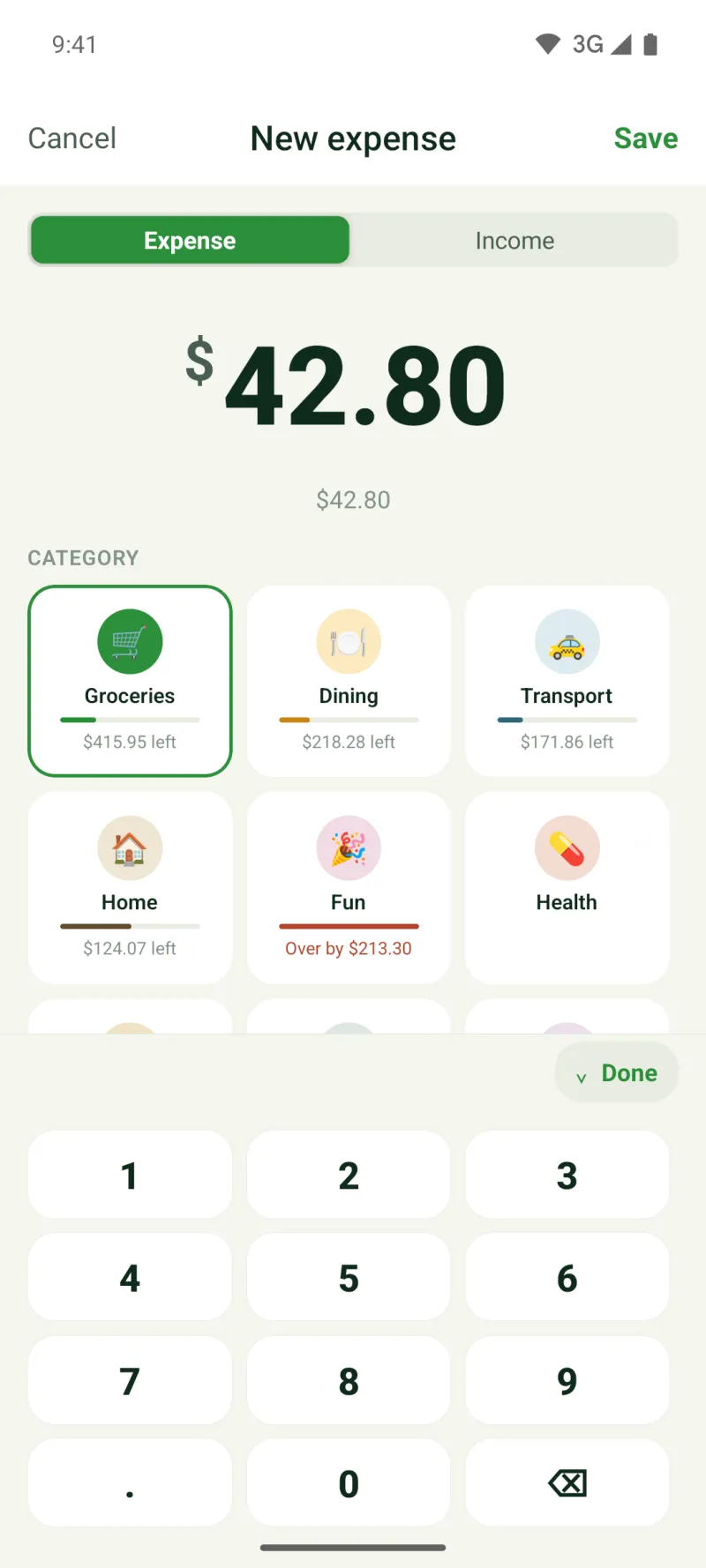
What you get by not linking a bank
- No bank login or password ever goes to a budgeting app or to a data aggregator.
- Cash, cards and accounts at any bank, in any country, are counted the same way.
- You see each expense at the moment you add it, which is when it can still change the next decision.
Example: a month by hand for two people
Say a couple adds about 90 expenses in a month: groceries, transport, eating out, the kids, bills. At roughly ten seconds each, that is about four minutes a week between the two of you, mostly spent right after paying, while the amount is still on the receipt or the screen.
Rent and other fixed bills can sit under “Upcoming” as recurring payments, so nobody types them every month (three on the free plan, any number with Plus). At the end of the month the home screen shows who spent how much and how each category did against its budget, and not a single bank statement has been read by the app.
What it costs you
The honest trade-off is effort and completeness. A bank connection pulls in every card payment whether you remember it or not; manual entry only knows what someone added. If one of you forgets a coffee, the budget is a coffee off. Most people who track by hand settle into one habit, adding each expense right after paying, and take a quick look once a week for gaps. A missed expense can be added later with the right date. If you know you will not keep that habit, manual tracking is not for you.
When a bank connection is the better choice
If you want every transaction to arrive by itself, see the balances of loans and investments, or reconcile accounts to the cent, an app built on bank connections does that job and manual entry does not. Our comparison of budget apps shows which apps connect to banks and on which plans.
If what holds you back is the risk of linking, we wrote a separate, calm guide: is it safe to link your bank to a budgeting app, covering what the app receives, who stores it and how to take access back.
And if what you need is to settle up with friends after a trip rather than to plan, a bill-splitting app is a better fit than either kind of budget app.
Doing this in Fam108
Fam108 is built only for manual entry: it never connects to a bank and has no import. Two people share one budget on their own phones (a budget for couples), each category can have a monthly budget, private expenses stay hidden from the rest of the family, and with Plus a trip or a project gets its own budget. The free plan covers two members, one space and three accounts. More on day-to-day tracking: the family expense tracker.
What it does not do
Fam108 does not read bank statements or card transactions, does not import files from banks or other apps, and does not convert currencies. With sync on, a copy of your entries is kept on our sync server, without end-to-end encryption; with sync off, they stay on your phone.
Budget app without a bank connection: questions and answers
Is a budget app without a bank connection safer?
It shares less: no bank login and no transaction feed leave your bank. What you type is still stored by the app, so it matters where. In Fam108 that is your phone, and our sync server when sync is on, without end-to-end encryption.
How long does manual tracking take?
About three taps per expense in Fam108. For a household that is a few minutes a week, if each expense is added right after paying.
Can I track cash?
Yes. Cash is just another account, and its expenses land in the same budgets and reports as card payments.
Can two people track by hand together?
Yes. Each adds expenses from their own phone and the budget updates on both; if both edit the same expense, the changes merge field by field.
Can I import my bank statement instead?
Not in Fam108: there is no import of any kind. If importing matters to you, an app with bank connections or statement import will suit you better.
What if we miss an expense?
Add it later and pick the day it happened; it counts in that day’s month. A quick weekly look at the home screen, where you see who spent how much, helps catch gaps.