Family budget · iPhone · Android · web
One shared budget for the two of you — and a separate one for every trip
Fam108 puts your family's spending in one place: budgets, accounts and who spent what, in sync on both phones and the web. A vacation, a renovation or a side business gets its own budget, currency and end date, so it never wrecks the month. No bank logins, no ads.
Not just for families. A couple, roommates, two co-founders — anywhere the money is shared and the wallets are not.
Free forever for two · No card · 14 days of Plus included

What's different
Other apps count money. We count life
Any budgeting app can sort receipts into categories. The trouble starts when a family picks up a second life — a vacation, a renovation, a side project. In an ordinary app that's one more line in the category list. In Fam108 it's a separate place with its own wallet.
A trip gets its own budget and its own end date
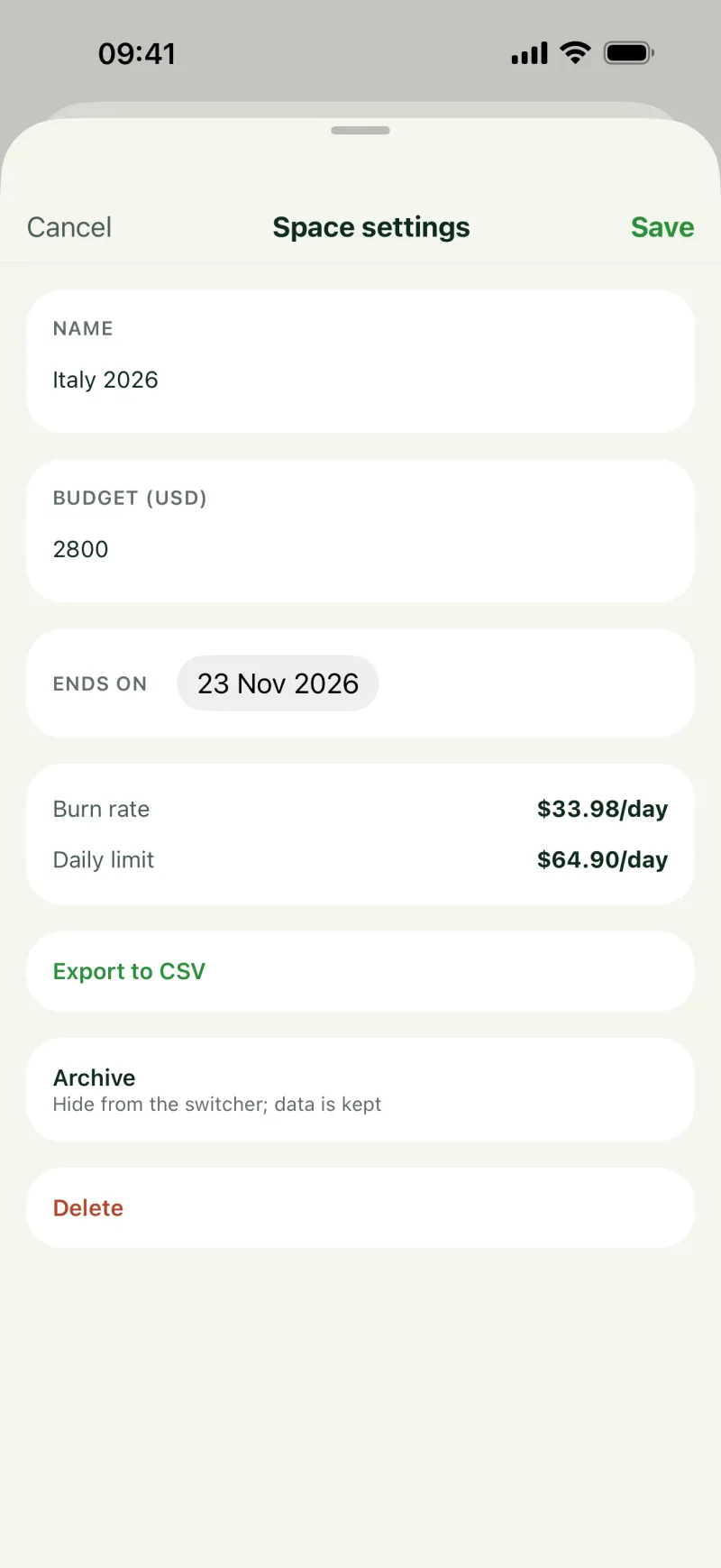
Goa for two weeks — $3,200 and September 14. The studio — $6,000 a month, with its own account and its own currency. The household budget doesn't drift because of it: every space is counted on its own, and the trip doesn't eat the month.
We don't connect to your accounts
No access to your bank accounts, no ads, no analytics SDKs, no trackers. You enter expenses yourself — two seconds, three taps. In return you pay for the app, not for somebody to look inside your bank.
A two-person startup is the same case
Shared money, separate wallets and the question of who put in how much work the same way for a family and for two co-founders. A separate space for the project, its own accounts, reimbursements and an export by space.
Edits don't overwrite each other
Two people edit the same entry from different phones — both changes survive, not just the one saved last. An invite is a single code, link or QR.
Features
What the app does
iPhone, Android and the web are the same app. Your data lives on your device and, when sync is on, on our server too, so the whole family sees it.
◈Spaces
- Family, trip, business, renovation — nested inside one another
- Each one has its own budget, currency and end date
- Close a trip and archive it without losing the history
- Face ID to open a space on your phone Plus
- To keep an expense from the family — a private entry or a private account
◉Family and roles
- Roles owner, adult, child — a child only sees their own expenses
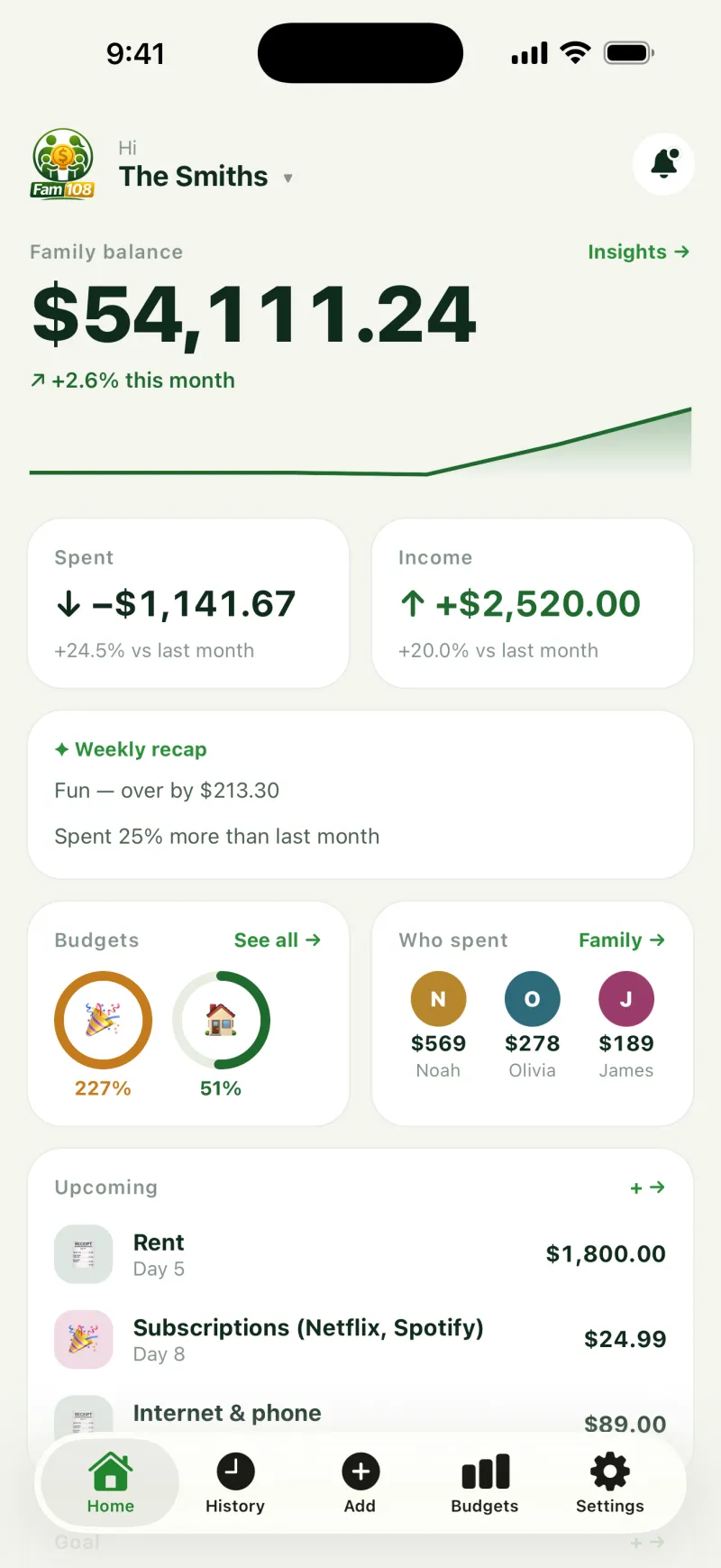
- Who spent how much this month — right on the home screen
- Invite by code or link, revoke the code in one tap
- Comments on expenses — the discussion sits with the expense Plus
▤Budgets
- Monthly and weekly, counted separately per space
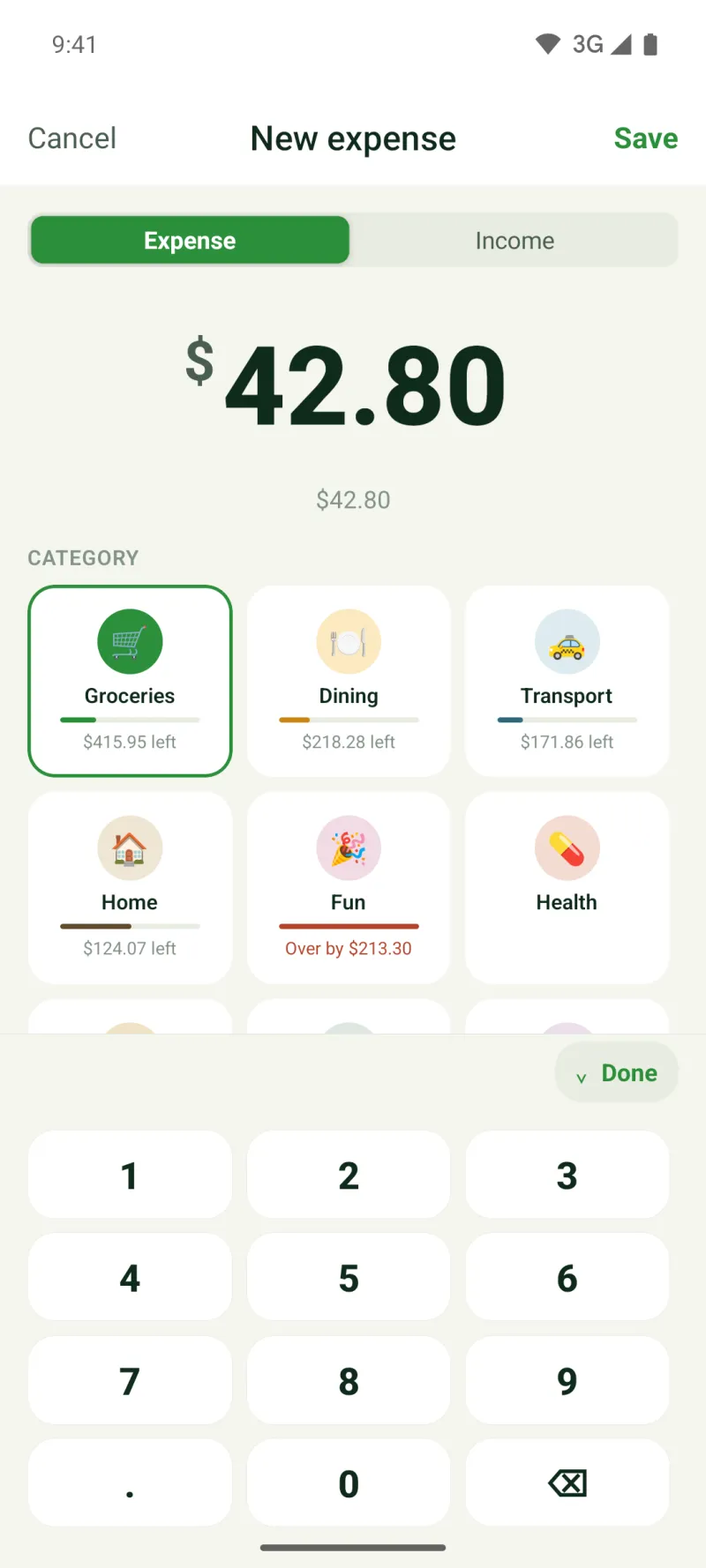
- What's left in a category is visible right as you enter the expense
- Recurring payments — rent, internet, classes — under “Upcoming”
- Savings goals; rounding change up into a goal is in the phone app
▦Accounts and money
- Cards, cash, bank accounts, private accounts for a member
- Income and expenses, plus private entries hidden from everyone else
- A photo of the receipt attaches to the expense
- Your own categories with your own emoji and color Plus
◔Analytics
- Views: a month, 3 months, 6 months, a year
- Spending breakdown by category and a “spent vs. earned” trend
- Weekly summary: what went over budget and by how much — always, on any plan
- CSV export — always, on any plan
⬢For your own business
- A business space kept apart from the family wallet
- Reimbursements: someone requests, someone approves or declines Business
- Reports by space and period, and how fast the budget is burning
- Export by space for the accountant
Plans
You pay for depth, not for the door
Sync and invites are free on every plan — a family shouldn't have to pay to be together. The free plan has no ads, no cap on how many expenses you log, and no charge for a second person. The paid plan starts where the app has already become necessary: a second space, a third member, receipt photos.
Free
For two people who need just one space — no ads, no cap on how many expenses you log
$0forever
No card, no time limit
- A second member and sync — free, no time limit
- Unlimited expenses and income
- 9 categories, monthly budgets
- 3 accounts
- CSV export
Plus
For a family whose life now has a second act — a trip, a renovation, a move — its own space and budget for each
or $3.99 a month · save 37% on the annual plan
- Unlimited spaces
- Up to 6 members
- Unlimited accounts, private accounts
- Weekly budgets and per-space budgets
- Receipt photos
- Comments, your own categories, Face ID to open a space on your phone
- Unlimited goals and recurring payments
Business
For a side business running on family money — reimbursements with approval and up to 12 members
or $8.99 a month · for your own business
- Everything in Plus
- Reimbursements for staff and family
- Up to 12 members
Checkout opens right here on the site, no App Store or Google Play needed. We're still wiring up payments, so clicking a plan shows a “coming soon” banner for now. 14 days of Plus are already available — they start themselves when your family turns on sync — for example, when you invite the second person. No card required.
Payment opens soon — start with the free period. Start free →Questions
Straight answers
What happens to my data if I stop paying?
Nothing gets deleted. Extra spaces, members and accounts switch to read-only: you still see them, you can still export them to CSV, and they keep syncing — you just can't add anything new until the subscription resumes. We don't delete what you entered by hand.
Why is there no bank connection?
A bank connection means a third party permanently sees every transaction you make. We chose manual entry: three taps per expense, and nobody standing between you and your money. The side effect is a pleasant one — the app costs less than the ones paying for that access.
Is sync really free?
Yes, on every plan, including the free one. A family app that charges you to invite the second person isn't a family app. The free plan is limited to two members, not to working together.
How is this better than a spreadsheet?
It isn't, if you live alone and like spreadsheets. The difference starts when two people run the budget and edit it at the same time from different phones, when you need to keep trip money apart from living money, and when six months later you have to work out where the year went.
Where is my data stored?
On your device. If you turn on family sync, a copy lives on our server so your family's other devices can see it. There is no end-to-end encryption — we say that plainly instead of hiding it: technically we can read the data on the server, which is exactly why we collect nothing beyond what's needed, show no ads, and let no third party near it. You can point the app at your own server. You can also never turn sync on, and then nothing leaves your device.
What happens after the 14 days?
Your family moves to the free plan. Nothing is deleted: anything you created beyond the free limits stays visible, keeps syncing and keeps exporting to CSV — you just can't add new items past the limit until you subscribe.
How do I cancel my subscription?
Bought in the app — manage or cancel it in your Apple ID or Google Play account settings; deleting the app does not cancel it. Bought on the website — Settings → “Manage subscription”. When a subscription ends, nothing is deleted: content beyond the free limits stays visible and synced, but becomes read-only. Refunds are covered in the Terms of Use, section 9.
What happens if Fam108 shuts down?
Your data isn't locked in with us. It lives on your device, and CSV export always works, on every plan — you can take out everything you entered at any time, without asking us.
Try it on your own family
The free plan is not a demo: a full budget for two, with no cap on the number of expenses and no time limit. Plus is for when a second life shows up.
 Coming soon
 Coming soon
Android today: download the APK (beta)
The web version works right away, nothing to install: the same app with the same data. Only the phone app has Face ID to open a space and rounding change up into a goal.